A coding agent is a loop: send the conversation to a language model, run whatever tools the model asks for, append the results, and ask again until the model stops asking. Everything else in Pi exists to make that loop reliable, observable, persistent and extensible. This chapter builds the loop from first principles so that every later chapter has a place to hang.
Learning goals. After this chapter you should be able to (1) explain what a language model computes and why it has a context window, (2) describe Pi's four message roles and its content blocks, (3) trace one iteration of the agent loop, and (4) name which Pi package is responsible for each part of a harness.
1.1 A language model is a function from tokens to a probability distribution
A large language model (LLM) does not see characters or words. Its input is first split by a tokenizer into tokens: integer ids for frequent character sequences ("function", " the", "{", or fragments of rarer words). The model is a very large neural network that, given a sequence of tokens t₁…tₙ, outputs a probability for every possible next token tₙ₊₁.
Text generation is autoregressive: pick one token from that distribution (sampling), append it to the input, and run the network again. Repeat until the model emits a special end-of-turn token or a length limit is hit. Two consequences matter for everything in this book:
- Output arrives one token at a time. A provider can send you each token (or a few) as soon as it is chosen. That is why Pi is built around streams of events rather than single responses (Chapter 3).
- The input is bounded. The network attends over a fixed maximum number of tokens, the context window. Every message, tool result and instruction must fit. When a conversation outgrows it, something must be dropped or summarized — this is compaction (Chapters 9 and 15).
Pi records these limits per model. The Model interface in packages/ai/src/types.ts carries, among other fields:
export interface Model<TApi extends Api> extends BaseModel<TApi> {
	reasoning: boolean;
	contextWindow: number;
	maxTokens: number;
	…
}
contextWindow is the input budget, maxTokens caps how many tokens one response may generate, reasoning says whether the model can produce hidden "thinking" before answering, and BaseModel.cost holds prices per million tokens. Because providers bill per token, a harness must also count tokens and money; every assistant message in Pi carries a Usage record with input, output, cacheRead, cacheWrite and a computed cost.
Sampling knobs. The distribution can be reshaped before sampling. Temperature divides the network's raw scores (logits) before they are normalized: below 1 sharpens the distribution toward the most likely token, above 1 flattens it. Pi exposes temperature and a free-form samplingParams bag (top_p, top_k, …) on StreamOptions, but most of the time it leaves them at provider defaults.
1.2 From completion to conversation: roles and messages
Chat models are trained on transcripts with roles. Pi's unified message type is a discriminated union — a set of object shapes that share one literal-typed field (role) telling them apart:
export type Message = SystemMessage | UserMessage | AssistantMessage | ToolResultMessage;SystemMessage(role: "system") holds instructions and tool declarations. The leading one is the system prompt. Unusually, Pi allows later system messages that add instructions, replace namedsections, or add and remove tools mid-conversation (toolsAdded,toolsRemoved). Replaying all system messages in order yields the current prompt and tool set. Providers that cannot accept a system message in the middle get the replayed state folded into the leading one instead.UserMessage(role: "user") holds text and images.AssistantMessage(role: "assistant") is what the model produced: an array of content blocks plus bookkeeping — whichapi,providerandmodelproduced it,usage, and astopReason.ToolResultMessage(role: "toolResult") answers one tool call, linked bytoolCallId, withisErrorset when the tool failed.
An assistant message's content is not a string but an ordered list of blocks, again a discriminated union, this time on type:
// packages/ai/src/types.ts (abridged)
export interface TextContent {
	type: "text";
	text: string;
	textSignature?: string;
}

export interface ThinkingContent {
	type: "thinking";
	thinking: string;
	thinkingSignature?: string;
	redacted?: boolean;
}

export interface ToolCall {
	type: "toolCall";
	id: string;
	name: string;
	arguments: JsonObject;
	…
}
Why a list? Because one response can interleave reasoning, prose and several tool calls ("I'll read both files" → call read → call read). Keeping each block separate lets the UI render them differently, lets the loop find the tool calls, and lets the harness send reasoning back to providers that require it.
The stopReason field tells the caller why generation ended:
export type StopReason = "pending" | "stop" | "length" | "toolUse" | "error" | "aborted" | "deferred";stop means the model finished its answer, toolUse means it is waiting for tool results, length means it ran into maxTokens, aborted means the user cancelled, and deferred means a provider accepted the request to finish asynchronously.
1.3 Tool calling: letting a model ask for actions
A model can only emit tokens. To let it act, providers support tool calling (also called function calling). The request declares tools; each declaration is a name, a natural-language description and a JSON Schema describing the arguments:
export interface Tool<TParameters extends TSchema = TSchema> {
	name: string;
	description: string;
	parameters: TParameters;
	constrainedSampling?: false | ConstrainedSamplingConfig;
}
TSchema comes from TypeBox, a library that builds JSON Schema objects with TypeScript types attached, so one definition gives both runtime validation and a static type. When the model decides to use a tool it emits a structured block — in Pi, a ToolCall with an id, the tool name and parsed arguments — and ends its turn with stopReason: "toolUse". The harness, not the model, executes the tool and returns a ToolResultMessage carrying the same id. Nothing happens in the world unless the harness chooses to do it; that is the trust boundary of every agent.
Two details recur throughout the book:
- Arguments are generated text. They arrive as a JSON string that may be malformed or may violate the schema. Pi keeps the raw failure in
ToolCall.argumentsErrorand validates arguments before running anything (Chapter 6). Some providers can enforce the schema during sampling (constrained decoding), whichconstrainedSamplingrequests (Chapter 5). - Tool calls have ids. A response may contain several calls; results must be matched back to calls exactly, in any order.
1.4 The agent loop
Pi's own documentation (packages/coding-agent/docs/how-pi-works.md) defines a turn: the provider streams an assistant response, Pi records it, executes each tool call, and records the results. "If tool results or queued messages require another model request, Pi starts another turn. Otherwise, the run ends." In simplified pseudocode (the real implementation is packages/agent/src/agent-loop.ts, studied in Chapter 6):
// Simplified pseudocode, not Pi source
async function run(transcript: Message[], tools: Tool[]) {
  while (true) {
    const reply = await callModel(transcript, tools);   // streamed
    transcript.push(reply);
    const calls = reply.content.filter(b => b.type === "toolCall");
    if (calls.length === 0) return reply;                  // stopReason "stop"
    for (const call of calls) {
      const result = await execute(call);                  // validate, run, catch errors
      transcript.push(result);                             // ToolResultMessage
    }
  }
}
This pattern is often called ReAct (reason + act): the model alternates between thinking about the task and taking actions whose observations feed the next step. The loop terminates when the model answers without calling a tool, when the user aborts, when an error occurs, or when the harness decides to stop.
Real loops add complications that this book will take apart one by one: responses stream in pieces; tools run in parallel; the user can steer (inject a message after the current turn) or queue a follow-up (after the run ends); a run can be aborted cooperatively; and the transcript must be persisted so a session can be resumed.
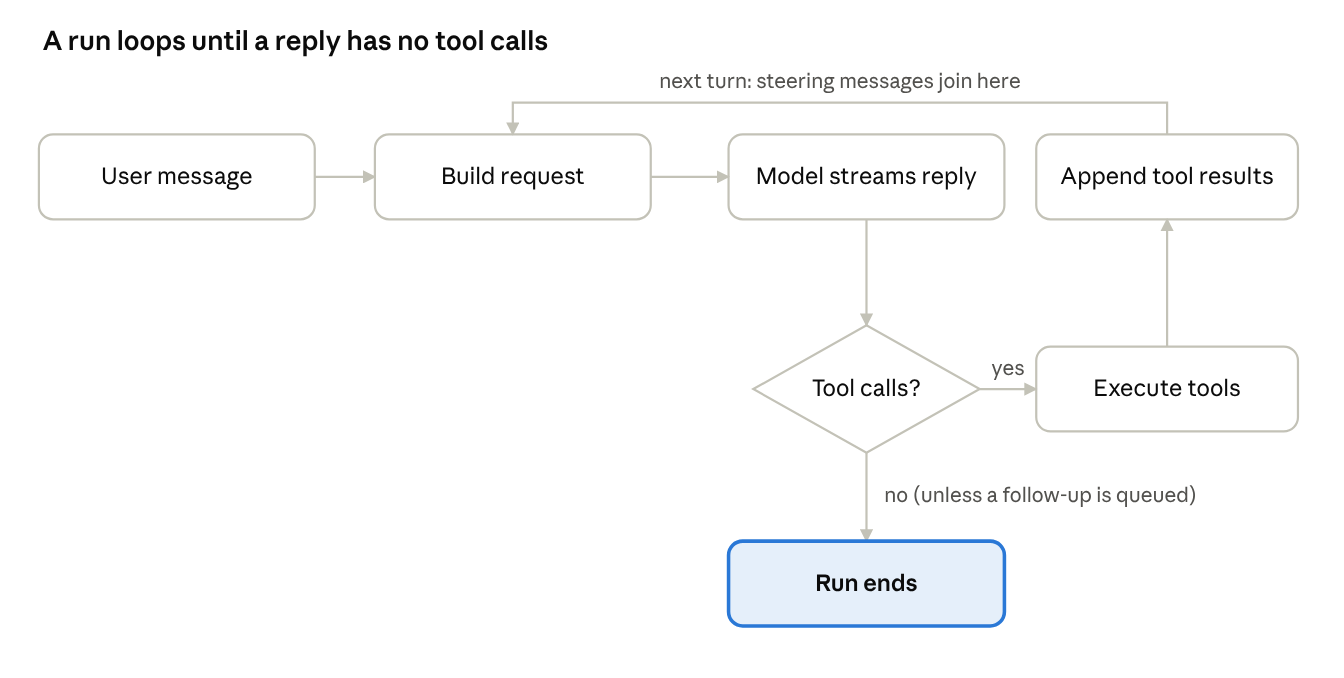 the agent loop · one turn and the loop back
Each pass around the loop is a turn. A reply with tool calls sends their results into the next request; a reply without them ends the run unless a follow-up message is waiting.
1.5 What a harness is responsible for
The model is a stateless function. Everything stateful or effectful lives in the harness. The table maps each responsibility to the Pi package that owns it.
| Responsibility | What it means | Where in Pi |
|---|---|---|
| Provider abstraction | One message format and one event stream for dozens of vendors | pi-ai (Ch. 3–5) |
| Credentials | API keys, OAuth logins, token refresh | pi-ai auth, coding-agent auth storage (Ch. 5, 9) |
| The loop | Turns, tool execution, events, steering, abort | pi-agent-core (Ch. 6) |
| Context assembly | System prompt, project instructions (AGENTS.md), skills, history | coding-agent system-prompt.ts, resource-loader.ts (Ch. 7, 10) |
| Tools | Read, write, edit files; run shell commands; search | coding-agent core/tools (Ch. 8) |
| Persistence | Sessions as a tree of entries in JSONL files | coding-agent session-manager.ts (Ch. 9) |
| Context budget | Token counting, compaction, overflow recovery | coding-agent core/compaction (Ch. 9) |
| Interfaces | Terminal UI, print/JSON output, RPC, SDK | coding-agent modes, pi-tui (Ch. 7, 11, 12) |
| Extensibility | Extensions, skills, prompt templates, packages, MCP | coding-agent extensions (Ch. 10) |
| Durability | Surviving crashes, resuming, task graphs, remote environments | pi-durable, pi-env (Ch. 13–16) |
The system prompt is a good example of context assembly. buildSystemPromptSections() in packages/coding-agent/src/core/system-prompt.ts produces named sections: an untagged preamble ("You are an expert coding assistant operating inside pi, a coding agent harness…"), then tools, rules, docs, an optional addendum, project_context (each instruction file wrapped in <project_instructions path="…">), skills, and cwd. Every non-preamble section is wrapped in an XML-like tag of the same name "so the model can match later updates to it". Project instruction files are discovered by name; resource-loader.ts looks for AGENTS.override.md, AGENTS.md, AGENTS.MD, CLAUDE.md and CLAUDE.MD.
1.6 Pi's design stance: a minimal core you extend
The repository README describes Pi as "a minimal, extensible agent harness that you can make your own". Three design choices follow and shape the code you will read:
- Few built-in features. "Pi ships with powerful defaults but skips features like sub-agents and plan mode. Ask Pi to build what you want, or install a package that does it your way." The default tool set is just
read,bash,editandwrite(the default ofselectedToolsinsystem-prompt.ts). - No permission system. "Pi does not include a built-in permission system for restricting filesystem, process, network, or credential access. By default, it runs with the permissions of the user and process that launched it." Isolation is delegated to containers or micro-VMs (
docs/containerization.md). This is the principle of keeping mechanisms out of the core when the operating system already provides a stronger one. - Everything is a library. The CLI is a thin layer over packages you can use directly:
pi-aito talk to models,pi-agent-coreto run a loop, the SDK to embed a full session, andpi-durablefor agents that must survive restarts.
1.7 Concepts introduced in this chapter
- Tokens and autoregressive generation. Text is processed as integer token ids; a model generates by repeatedly predicting a distribution over the next token and sampling from it. Cost and limits are measured in tokens, not characters.
- Context window. The maximum number of tokens the model can condition on. It turns conversation history into a scarce resource that must be budgeted.
- Discriminated (tagged) unions. A union of object types distinguished by a literal field (
role,type). TypeScript narrows the type when you test that field, soif (block.type === "toolCall") block.argumentstype-checks. Pi uses this pattern for messages, content blocks, stream events and session entries. - JSON Schema. A JSON vocabulary for describing the shape of JSON values (types, required properties, enums). It is how tools tell models what arguments they accept and how harnesses validate what came back.
- Trust boundary. The line between untrusted input (model output) and effectful code (tool execution). A harness validates and decides at this line.
- Control loop. A loop that observes state, decides, acts and repeats until a termination condition holds. The agent loop is one; the termination proof is informal ("the model eventually stops calling tools"), which is why abort and limits matter.
Exercises
- Using the
StopReasonunion, list which values should end the agent loop and which should continue it. Where wouldlengthfit, and what could a harness do about it? - Why does
ToolResultMessagecarry bothtoolCallIdandtoolNamewhen the id alone identifies the call? Find a provider format that needs the name (hint: Chapter 4). - Write a TypeScript function
countToolCalls(messages: Message[]): numberthat relies on narrowing overroleandtypewithout casts. - Pi allows system messages mid-conversation. Describe one benefit for prompt caching (Chapter 4) and one risk for providers that do not support it.
- Read
how-pi-works.mdin full and draw your own version of the turn diagram. Mark where steering and follow-up messages enter.