pi-tui is a "Minimal terminal UI framework with differential rendering and synchronized output for flicker-free interactive CLI applications" (its README). Its central idea is radically simple: a component is a function from a width to an array of strings, and the framework rewrites only the terminal lines that changed since the last frame. Everything difficult lives at the edges — decoding the byte stream a terminal sends as keyboard input, measuring how many columns a string occupies, moving the cursor with escape sequences, and keeping the screen from flickering.
Learning goals. Explain what a terminal is from a program's point of view (raw mode, escape sequences, the two screen buffers); describe the component model and the differential renderer; explain why parsing keyboard input needs a buffering state machine; compute the display width of Unicode text; describe the editor's undo stack, kill ring and paste handling.
12.1 What a terminal is
A terminal emulator is a program that draws a grid of character cells and talks to your process through a pseudo-terminal device (a TTY). Your program writes bytes to stdout; the terminal interprets printable characters as text and escape sequences — byte strings starting with ESC (\x1b) — as commands. A few that Pi uses, with their standard meanings:
| Sequence | Meaning |
|---|---|
\x1b[2K | Erase the current line |
\x1b[nA / \x1b[nB | Move the cursor up / down n lines |
\r | Return to column 0 |
\x1b[2J\x1b[H\x1b[3J | Clear screen, cursor home, clear scrollback |
\x1b[?2026h … \x1b[?2026l | Begin / end synchronized output |
\x1b[?2004h | Enable bracketed paste |
\x1b[?1049h | Switch to the alternate screen buffer |
\x1b[…m | Select graphic rendition: colours, bold, … |
Input flows the other way. By default the TTY's line discipline is in cooked mode: it buffers a whole line, handles backspace itself, and turns Ctrl+C into a SIGINT signal. An editor needs every keystroke immediately, so ProcessTerminal.start() calls process.stdin.setRawMode(true). In raw mode bytes arrive as typed, and — as the README warns — "In raw mode Ctrl+C doesn't send SIGINT", so the application must handle it as an ordinary key.
Terminals keep two screen buffers. The main screen has scrollback history; the alternate screen (used by vim, less) is a fixed grid that disappears on exit. Pi offers both through one TUI interface: TuiMainScreen "renders into the main terminal buffer and preserves terminal scrollback", while TuiAltScreen "renders a fixed-height viewport in the alternate terminal buffer with application-owned scrolling. When stopped, it restores the main buffer and prints the complete final document." Main-screen rendering keeps the conversation in your terminal's history after Pi exits; alt-screen rendering gives the application control of scrolling and mouse.
12.2 The component model
export interface Component {
	/**
	 * Render the component to lines for the given viewport width
	 * @param width - Current viewport width
	 * @returns Array of strings, each representing a line
	 */
	render(width: number): string[];
	handleInput?(data: string): void;
	handleMouse?(event: TuiMouseEvent): TuiMouseEventResult | undefined;
	wantsKeyRelease?: boolean;
	invalidate(): void;
}
A component knows nothing about where it is on screen. Its parent concatenates children's lines (Container), pads them (Box), arranges them side by side (HStack) and so on; the TUI itself is a Container. Each line may contain styling escape codes but must not exceed width visible columns — the renderer checks and writes a crash log if a line is too wide. invalidate() drops cached rendering (for example after a theme change). One component has focus and receives keyboard input through handleInput.
Compared with frameworks such as React-based Ink, there is no virtual DOM, no reconciliation of a component tree and no layout engine in the core path: the "virtual" representation is simply the previous array of lines. That is enough because a terminal is a grid of lines, and a coding agent's UI is mostly a growing transcript.
12.3 Scheduling frames
Components call tui.requestRender() whenever their state changes. The request is coalesced and throttled (tui.ts):
requestRender(force = false): void {
	if (force) { … }
	if (this.renderRequested) return;
	this.renderRequested = true;
	process.nextTick(() => this.scheduleRender());
}

private scheduleRender(): void {
	if (this.stopped || this.renderTimer || !this.renderRequested) {
		return;
	}
	const elapsed = performance.now() - this.lastRenderAt;
	const delay = Math.max(0, TuiBase.MIN_RENDER_INTERVAL_MS - elapsed);
	this.renderTimer = setTimeout(() => {
		this.renderTimer = undefined;
		if (this.stopped || !this.renderRequested) {
			return;
		}
		this.renderRequested = false;
		this.lastRenderAt = performance.now();
		this.doRender();
		if (this.renderRequested) {
			this.scheduleRender();
		}
	}, delay);
}
A boolean flag collapses any number of requests into one; MIN_RENDER_INTERVAL_MS = 16 caps the frame rate near 60 per second. This is throttling (at most one action per interval, trailing edge guaranteed) as opposed to debouncing (act only after quiet). Throttling is right here: a streaming reply must keep updating while tokens flow, not wait for silence.
12.4 Differential rendering
TuiMainScreen.doRender() renders the whole component tree to newLines, composites overlays (dialogs drawn over content), then compares with previousLines:
let firstChanged = -1;
let lastChanged = -1;
const maxLines = Math.max(newLines.length, this.previousLines.length);
for (let i = 0; i < maxLines; i++) {
	const oldLine = i < this.previousLines.length ? this.previousLines[i] : "";
	const newLine = i < newLines.length ? newLines[i] : "";
	if (oldLine !== newLine) {
		if (firstChanged === -1) {
			firstChanged = i;
		}
		lastChanged = i;
	}
}
Then it writes only the range firstChanged..lastChanged: move the cursor to the first changed row with relative cursor moves (computed from the tracked hardware cursor row), and for each line emit \x1b[2K (erase) plus the new content. The comment explains the payoff: "Only render changed lines (firstChanged to lastChanged), not all lines to end. This reduces flicker when only a single line changes (e.g., spinner animation)." When a streaming reply grows by one line, typically only that line and the editor below it are rewritten.
The diff is deliberately crude — one contiguous changed range rather than a minimal edit script — because terminals cannot insert lines into scrollback cheaply, and the common cases (append, a spinner, the editor) produce one small range anyway. Several conditions fall back to a full render (clear screen and scrollback, write everything):
- the first render;
- a width change, "because wrapping changes" every line;
- a height change (except in Termux, where the on-screen keyboard changes the height constantly and "a full redraw causes the entire history to replay on every toggle" — a platform quirk encoded as a special case);
- a change above the visible viewport: "Differential rendering can only touch what was actually visible" — a line that has scrolled into the terminal's scrollback cannot be addressed by cursor movement anymore.
Every write is wrapped in synchronized output (\x1b[?2026h … \x1b[?2026l): supporting terminals buffer everything in between and present it at once, so the user never sees a half-drawn frame. This is the terminal analogue of double buffering in graphics. Output goes through a BoundedTerminalWriter that flushes in bounded chunks so a huge frame does not create one gigantic write.
Inline images (Kitty and iTerm2 graphics protocols) complicate everything: an image spans several rows but appears as one "line", so the changed range is expanded to whole images and stale images are deleted by id before redrawing.
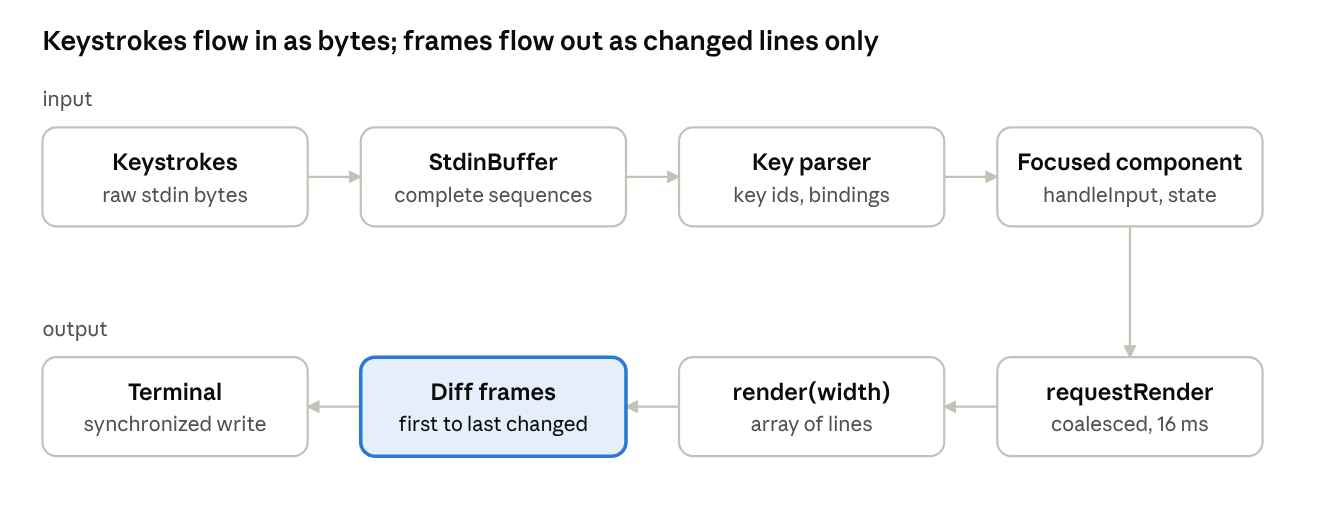 pi-tui · input and output pipelines
Input is reassembled into complete escape sequences before keys are matched; output is coalesced into frames and only the changed line range is rewritten.
12.5 Parsing keyboard input
The terminal reports keys as bytes. Plain letters are themselves; special keys are escape sequences: Up is \x1b[A, Ctrl+Left may be \x1b[1;5D, and with the Kitty keyboard protocol (which Pi negotiates when available, because legacy encodings "lose modifier information") a key is \x1b[<code>;<modifiers>u. Mouse events and replies to terminal queries are escape sequences too.
The operating system delivers stdin in arbitrary chunks. stdin-buffer.ts explains the problem with an example: the mouse sequence \x1b[<35;20;5m "might arrive as: Event 1: \x1b, Event 2: [<35, Event 3: ;20;5m". Without buffering, the lone \x1b would be read as the Escape key and the rest as typed text. StdinBuffer accumulates bytes and emits only complete sequences, using the grammar of escape sequences (CSI sequences end in a byte in the range @–~, OSC sequences end with BEL or ESC \, and so on) — a finite-state machine over the byte stream. A real ambiguity remains: a lone ESC might be the start of a sequence or the Escape key; such parsers resolve it with a short timeout.
keys.ts then maps complete sequences to key identifiers (matchesKey(data, "ctrl+c"), parseKey(data)). Applications never compare bytes directly; AGENTS.md even forbids hard-coded key checks in favour of configurable bindings (keybindings.ts, Chapter 2).
Bracketed paste (\x1b[?2004h) makes the terminal wrap pasted text in \x1b[200~ … \x1b[201~. Without it, a pasted newline is indistinguishable from pressing Enter and would submit a half-pasted prompt. The editor collapses large pastes into a marker such as [paste #1 +123 lines] and treats that marker as one atomic unit for cursor movement and deletion, keeping the real text in a side table.
12.6 How wide is a string?
To wrap and truncate lines, the renderer must know how many terminal columns a string occupies. That is not its length:
- Escape sequences occupy zero columns.
- A user-perceived character (grapheme cluster) can be several code points:
éwritten ase+ U+0301, a flag made of two regional-indicator symbols, or a family emoji joined with zero-width joiners. - East Asian wide characters and most emoji occupy two columns.
- Combining marks and zero-width characters occupy none.
visibleWidth() in utils.ts handles this in tiers. A fast path handles printable ASCII and escape codes without any Unicode machinery ("Styled lines take this path, so re-rendering after a theme change does not run grapheme segmentation on every line"). Otherwise it strips escape sequences, splits the text into graphemes with Intl.Segmenter (granularity: "grapheme"), and sums graphemeWidth() per cluster: 1 for ASCII, 3 for a tab (Pi expands tabs to three spaces), 0 for zero-width clusters, 2 for RGI emoji, and otherwise the East Asian Width property of the base code point (via the get-east-asian-width package). Results are memoized in a Map capped at a fixed size, evicting the oldest key when full — a FIFO cache that relies on JavaScript Map iterating in insertion order.
The lesson generalizes: "character" is ambiguous. Bytes (UTF-8), code units (JavaScript's UTF-16 length), code points, grapheme clusters and display columns are five different measures, and terminal software must use the right one at each step.
12.7 The editor
components/editor.ts (about 2,500 lines) is a multi-line text editor. Its state is small:
interface EditorState {
	lines: string[];
	cursorLine: number;
	cursorCol: number;
}
Text is an array of lines — the simplest buffer representation, fine for prompt-sized text (large editors use gap buffers, ropes or piece tables to make insertion cheap in huge documents). Some notable features:
- Undo uses
UndoStack<EditorSnapshot>, which stores deep clones (structuredClone) of whole snapshots — the memento pattern. Snapshotting the full state is simple and correct for small buffers. Typing is grouped into sensible units: "Consecutive word chars coalesce into one undo unit", while each space is separately undoable. - Kill ring. Emacs-style kill (cut) and yank (paste).
KillRingkeeps a list of killed texts; consecutive kills accumulate into one entry (prepending for backward deletion, appending for forward), and yank-pop rotates through older entries. - Word navigation uses
Intl.Segmenterwithgranularity: "word", so word boundaries are correct in languages without spaces. - Autocomplete for file paths and slash commands, filtered with
fuzzyMatch(). - History of submitted prompts.
fuzzy.ts implements subsequence matching with heuristic scoring (lower is better): every query character must appear in order; consecutive matches earn increasing bonuses (score -= consecutiveMatches * 5), gaps cost 2 per skipped character, a match at a word boundary (after space, -, _, ., / or :) earns -10, later positions cost 0.1 per index, and an exact match earns -100. If a query like v2 fails, it retries with letters and digits swapped. This is the same family of algorithm as editor "go to file" pickers: greedy left-to-right matching with a hand-tuned scoring function, linear in the text length.
12.8 Colour, markdown and more
colors.ts and oklab.ts work in OKLab, a perceptual colour space by Björn Ottosson (ported from his reference implementation). In sRGB, equal numeric steps do not look equally different; in a perceptually uniform space they roughly do, so mixing and lightening colours for themes gives predictable results. terminal-colors.ts queries the terminal's actual palette and background (OSC replies) so themes can adapt to light and dark terminals. components/markdown.ts renders Markdown (parsed with the marked library) to styled lines; latex.ts renders mathematics to Unicode; terminal-image.ts encodes images for the Kitty and iTerm2 protocols.
12.9 Concepts in this chapter
- TTYs, line discipline, cooked vs raw mode. The kernel layer between a terminal and a process, and how programs take full control of input.
- ANSI/VT escape sequences. In-band control codes for cursor movement, erasing, colour and modes.
- Retained output, diffed frames. Keep the previous frame, compute the changed region, write only that.
- Double buffering / synchronized updates. Present a complete frame atomically to avoid tearing and flicker.
- Throttling vs debouncing. Bound the rate of an action vs wait for inactivity.
- Streaming parsers as finite-state machines. Accumulate input until a complete token is recognized; handle ambiguity (a lone ESC) explicitly.
- Unicode text model. Bytes, code units, code points, grapheme clusters, display width; normalization and segmentation.
- Memoization with bounded caches. Cache expensive results, with an eviction policy.
- Memento pattern and undo. Snapshot state to restore later.
- Kill ring (ring buffer). A bounded history of cut text with rotation.
- Fuzzy subsequence matching. Score candidate matches by contiguity, boundaries and position.
- Perceptual colour spaces. Spaces where Euclidean distance approximates perceived difference.
Exercises
- Write a 40-line program that puts the terminal in raw mode and prints the bytes of each keypress. Press Up, Ctrl+Left, Alt+x and paste a multi-line string with and without bracketed paste.
- Given previous lines
["a","b","c"]and new lines["a","B","c","d"], list the escape sequencesdoRenderwould emit (assume the cursor is on the last line and no viewport scrolling). - Compute
visibleWidthfor:"abc","\x1b[31mred\x1b[0m","日本","é","👨👩👧". Which use the fast path? - Explain why a change above the viewport forces a full redraw on the main screen but not necessarily on the alternate screen.
- Score
fuzzyMatch("sm", "session-manager.ts")by hand. Then propose a change to the scoring that prefers camelCase boundaries. - Replace
UndoStack's full snapshots with a diff-based undo log. When is it worth the complexity?